
As an MSSP, staying on top of your clients' domain security activity is key to delivering proactive service. With the new webhook feature in your MSSP panel, you can now receive instant notifications whenever a user scans a domain and generates a PDF report through PowerAnalyzer — without having to log in and check manually.
Why this matters: If you have embedded the PowerAnalyzer widget on your website, you can now be notified instantly when a visitor runs a scan — turning it into a lead capture and engagement signal with no manual effort.
How to Enable the Webhook
1 Log in to your MSSP Portal
Sign in to your PowerDMARC MSSP account.
Sign in to your PowerDMARC MSSP account.
2 Navigate to the Administration Section
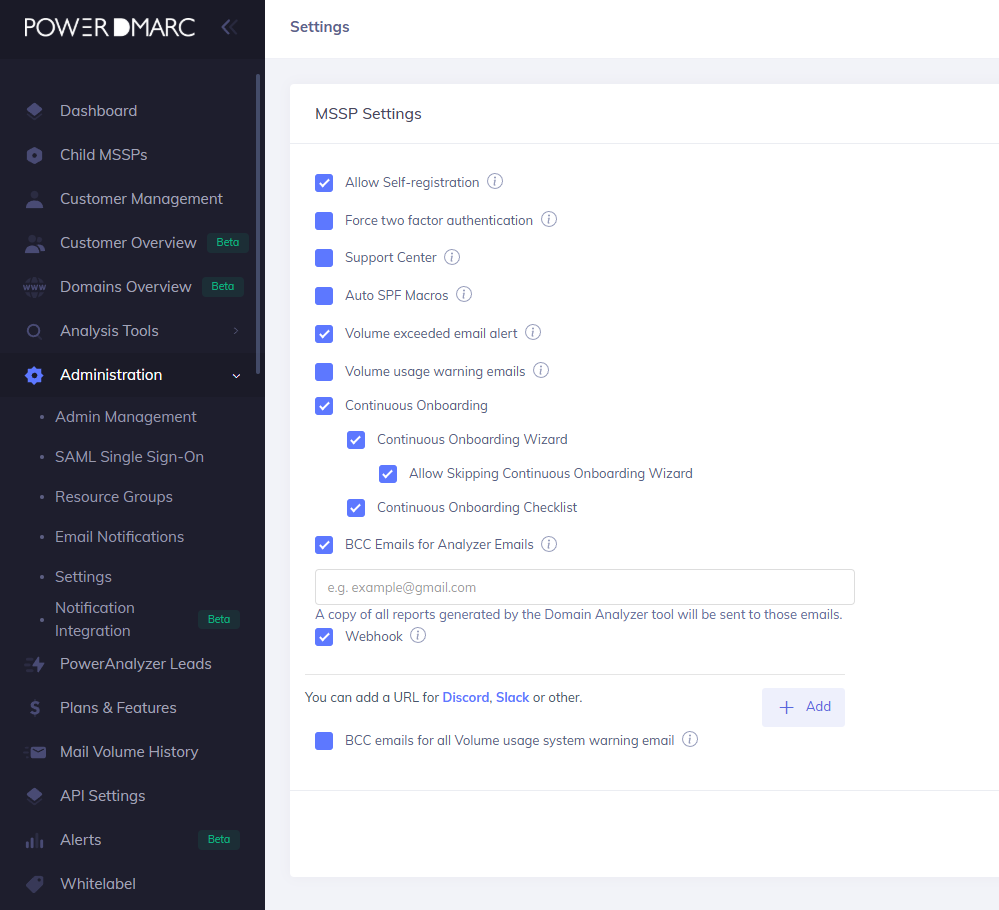
From the left-hand sidebar menu, go to Settings > Webhooks.
From the left-hand sidebar menu, go to Settings > Webhooks.
3 Open Webhook Settings
4 Enter Your Webhook URL
Paste your webhook endpoint URL into the provided field.
Paste your webhook endpoint URL into the provided field.
5 Save and Activate
Click Save to activate the webhook. The integration will become active immediately.
Click Save to activate the webhook. The integration will become active immediately.
Note: Make sure your webhook endpoint is publicly accessible.
What Triggers a Webhook Notification?
A webhook event is fired when a user:
- Runs a domain scan using your embedded PowerAnalyzer widget or even through the end user account directly and downloads the result as a PDF report
- Shares the PDF report via the built-in sharing options (e.g., QR code scan or email send)